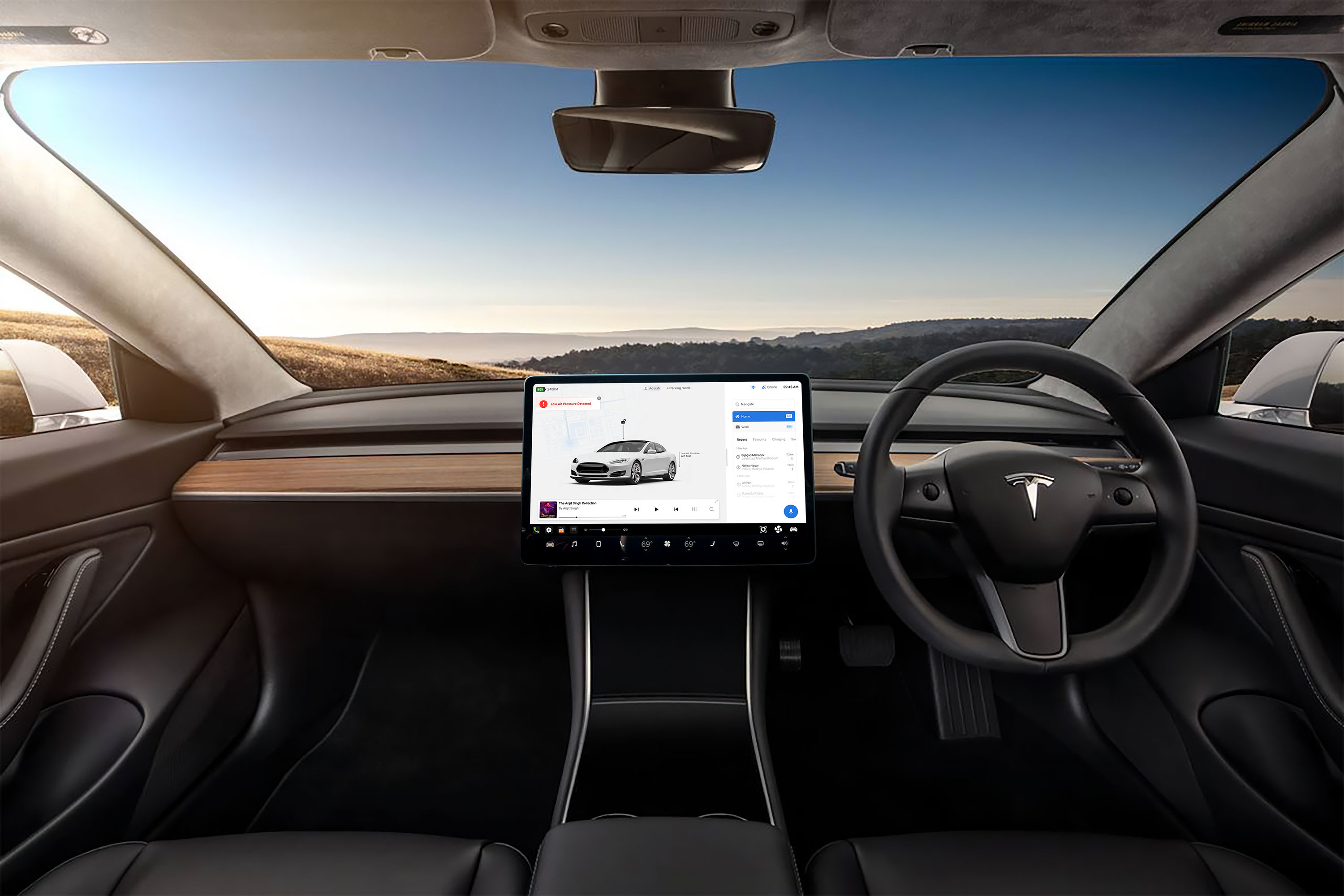
What if Tesla had to navigate more than just roads like potholes, patchy internet, Hinglish voice commands, and the GREAT INDIAN JUGAD!
Objective & approach
Objective & approach
Objective & approach
The main goal of this redesign was to identify potential issues users might face while using Tesla’s navigation in India and propose key feature adjustments to enhance the driving experience and interaction. while the system features and options can be placed on the status and tool bar. here we didn’t interfered that of system features, options and indicators
The main goal of this redesign was to identify potential issues users might face while using Tesla’s navigation in India and propose key feature adjustments to enhance the driving experience and interaction. while the system features and options can be placed on the status and tool bar. here we didn’t interfered that of system features, options and indicators
The main goal of this redesign was to identify potential issues users might face while using Tesla’s navigation in India and propose key feature adjustments to enhance the driving experience and interaction. while the system features and options can be placed on the status and tool bar. here we didn’t interfered that of system features, options and indicators

Identify
Identify

Prioritize
Prioritize

Restructure
Restructure

Optimize
Optimize
Challenges
Challenges
Limited User Data Access
Limited User Data Access
Since Tesla vehicles aren’t widely available in India, we had to rely on indirect sources like YouTube reviews, Reddit threads, and interviews of Indian EV drivers.
Since Tesla vehicles aren’t widely available in India, we had to rely on indirect sources like YouTube reviews, Reddit threads, and interviews of Indian EV drivers.
Since Tesla vehicles aren’t widely available in India, we had to rely on indirect sources like YouTube reviews, Reddit threads, and interviews of Indian EV drivers.
Tesla UI Access Restrictions
Tesla UI Access Restrictions
Tesla’s in-car UI and internal system designs are proprietary and partially closed to public deep-dives.
Tesla’s in-car UI and internal system designs are proprietary and partially closed to public deep-dives.
Tesla’s in-car UI and internal system designs are proprietary and partially closed to public deep-dives.
Ergonomics and Cultural Mismatch
Ergonomics and Cultural Mismatch
Tesla UIs are primarily built for left-hand drive models, whereas India follows right-hand drive standards.
Tesla UIs are primarily built for left-hand drive models, whereas India follows right-hand drive standards.
Tesla UIs are primarily built for left-hand drive models, whereas India follows right-hand drive standards.
Balancing Innovation with Simplicity
Balancing Innovation with Simplicity
There was a constant tension between adding cool futuristic features vs. keeping the system extremely simple for Indian road conditions.
There was a constant tension between adding cool futuristic features vs. keeping the system extremely simple for Indian road conditions.
There was a constant tension between adding cool futuristic features vs. keeping the system extremely simple for Indian road conditions.
before we proceed,
before we proceed,
this is me & my team (myself, AI partners and my desktop)
this is me & my team (myself, AI partners and my desktop)
this is me & my team (myself, AI partners and my desktop)
Prashant Mukati
Lead Product & UI/UX Designer
Lead Product & UI/UX Designer
Lead Product & UI/UX Designer
interaction Designer
interaction Designer
interaction Designer
My Role
As the Lead Product & UI/UX Designer, I led this concept redesign to explore what a truly India-optimized Tesla navigation system might look like and how the interaction between the Indian customer and the navigation computer should be designed
As the Lead Product & UI/UX Designer, I led this concept redesign to explore what a truly India-optimized Tesla navigation system might look like and how the interaction between the Indian customer and the navigation computer should be designed
As the Lead Product & UI/UX Designer, I led this concept redesign to explore what a truly India-optimized Tesla navigation system might look like and how the interaction between the Indian customer and the navigation computer should be designed
Timeline
March 2025- Current
In process-based on new initiatives and testings
March 2025- Current
In process-based on new initiatives and testings
March 2025- Current
In process-based on new initiatives and testings
Tools Used
Figma
Figma
Figma
Notion
Notion
Notion
ChatGPT
ChatGPT
ChatGPT
Google Sheets
Google Sheets
Google Sheets
YouTube & Reddit (to audit real Tesla user experiences)
YouTube & Reddit (to audit real Tesla user experiences)
YouTube & Reddit (to audit real Tesla user experiences)
The Problems❗
The Problems❗
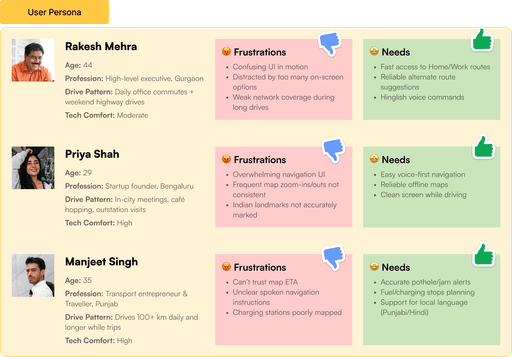
India’s driving landscape is not just different, it’s unpredictable, overwhelming, and at times even chaotic. A navigation system that works flawlessly in California might fall apart in Bangalore traffic or while driving through the hills of Himachal.
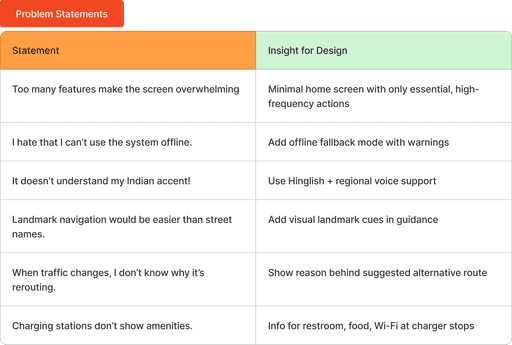
Through research, user observation, and feedback mining, the following critical issues emerged that Tesla’s current navigation UI may face in India
India’s driving landscape is not just different, it’s unpredictable, overwhelming, and at times even chaotic. A navigation system that works flawlessly in California might fall apart in Bangalore traffic or while driving through the hills of Himachal.
Through research, user observation, and feedback mining, the following critical issues emerged that Tesla’s current navigation UI may face in India
India’s driving landscape is not just different, it’s unpredictable, overwhelming, and at times even chaotic. A navigation system that works flawlessly in California might fall apart in Bangalore traffic or while driving through the hills of Himachal.
Through research, user observation, and feedback mining, the following critical issues emerged that Tesla’s current navigation UI may face in India


Ideations & Brainstorming
Ideations & Brainstorming
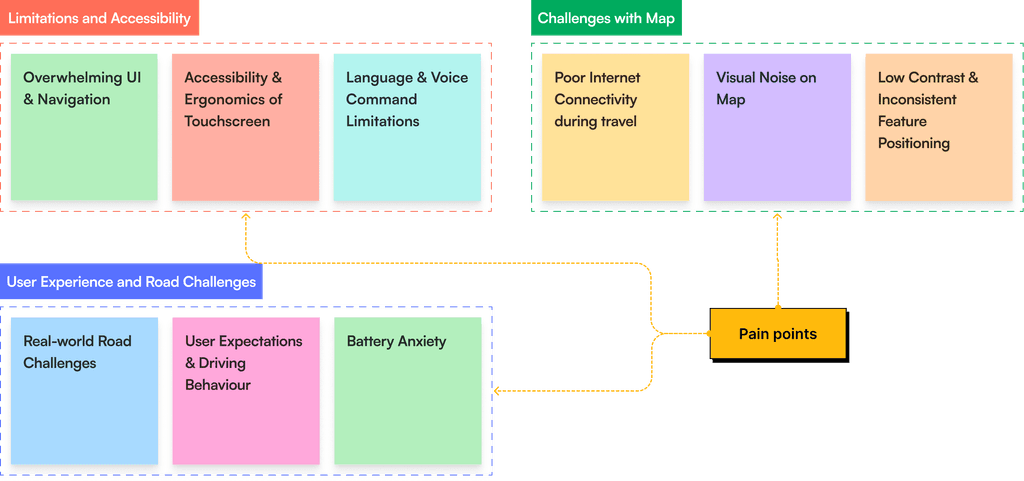
After understanding the user needs, problems and behaviour we headed towards writting out the pain points according to user statements. divided problems in 3 categories
Limitations and Accessibility
Limitations and Accessibility
Challenges with Map
Challenges with Map
User Experience and Road Challenges
User Experience and Road Challenges
these categorisation gave a lot of clarity on prioritising features and solutions. next step was to design and determine what should be the new design and approach for the new features.
adding features in existing design was too difficult and that lead us to change the interface significantly, but I wanted it to be a bit familiar and relevant.
Tesla navigation design system, User Manual helped a lot in understanding the features and design thought behind the original interface. scroll down to read my thought process of this initial initiatives.
these categorisation gave a lot of clarity on prioritising features and solutions. next step was to design and determine what should be the new design and approach for the new features.
adding features in existing design was too difficult and that lead us to change the interface significantly, but I wanted it to be a bit familiar and relevant.
Tesla navigation design system, User Manual helped a lot in understanding the features and design thought behind the original interface. scroll down to read my thought process of this initial initiatives.
these categorisation gave a lot of clarity on prioritising features and solutions. next step was to design and determine what should be the new design and approach for the new features.
adding features in existing design was too difficult and that lead us to change the interface significantly, but I wanted it to be a bit familiar and relevant.
Tesla navigation design system, User Manual helped a lot in understanding the features and design thought behind the original interface. scroll down to read my thought process of this initial initiatives.

Limitations and Accessibility
The very first step was to remove extra overwhelming features and steps from the UI that were not alligned with indian roadway and transport infrastructure
The very first step was to remove extra overwhelming features and steps from the UI that were not alligned with indian roadway and transport infrastructure
The very first step was to remove extra overwhelming features and steps from the UI that were not alligned with indian roadway and transport infrastructure
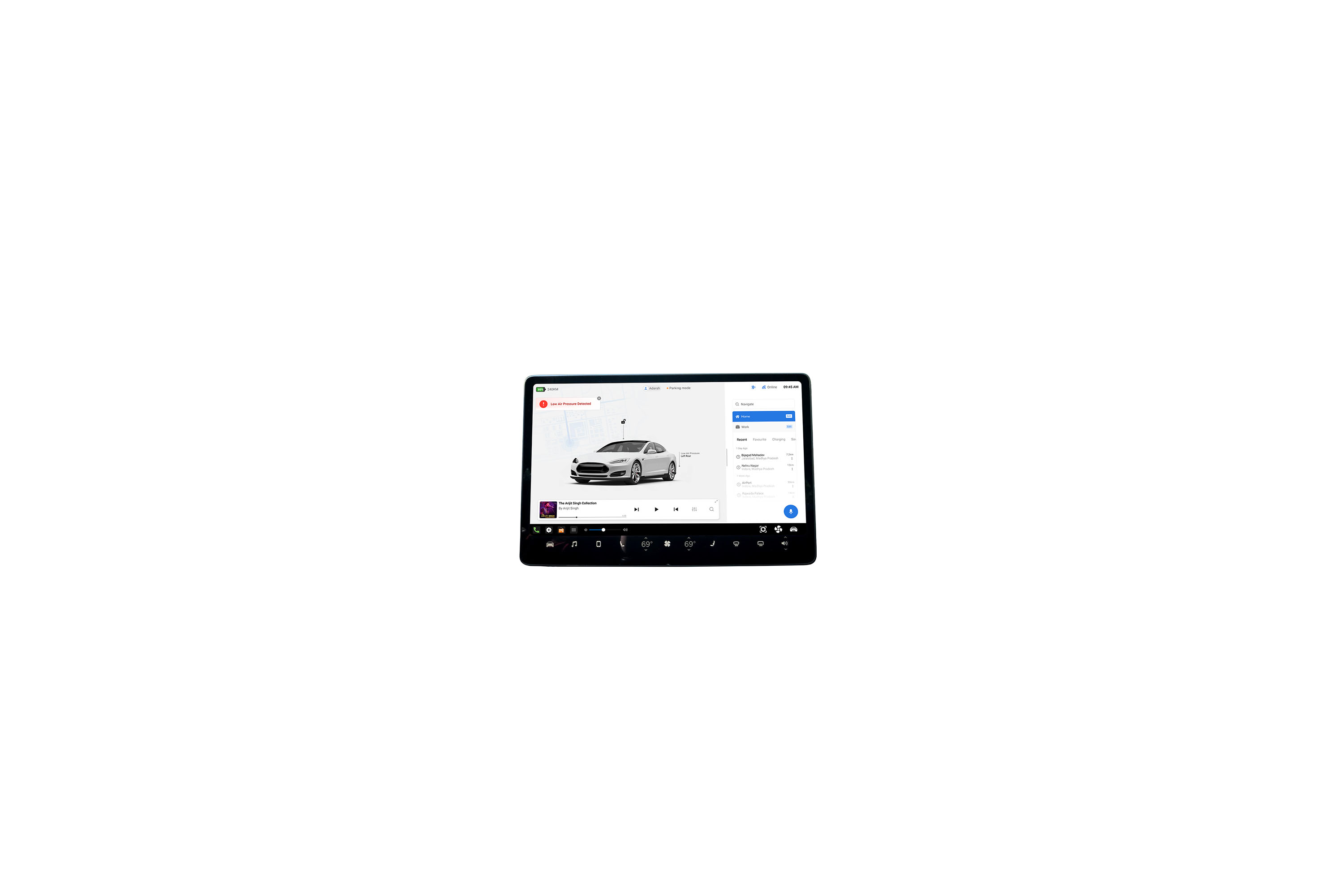
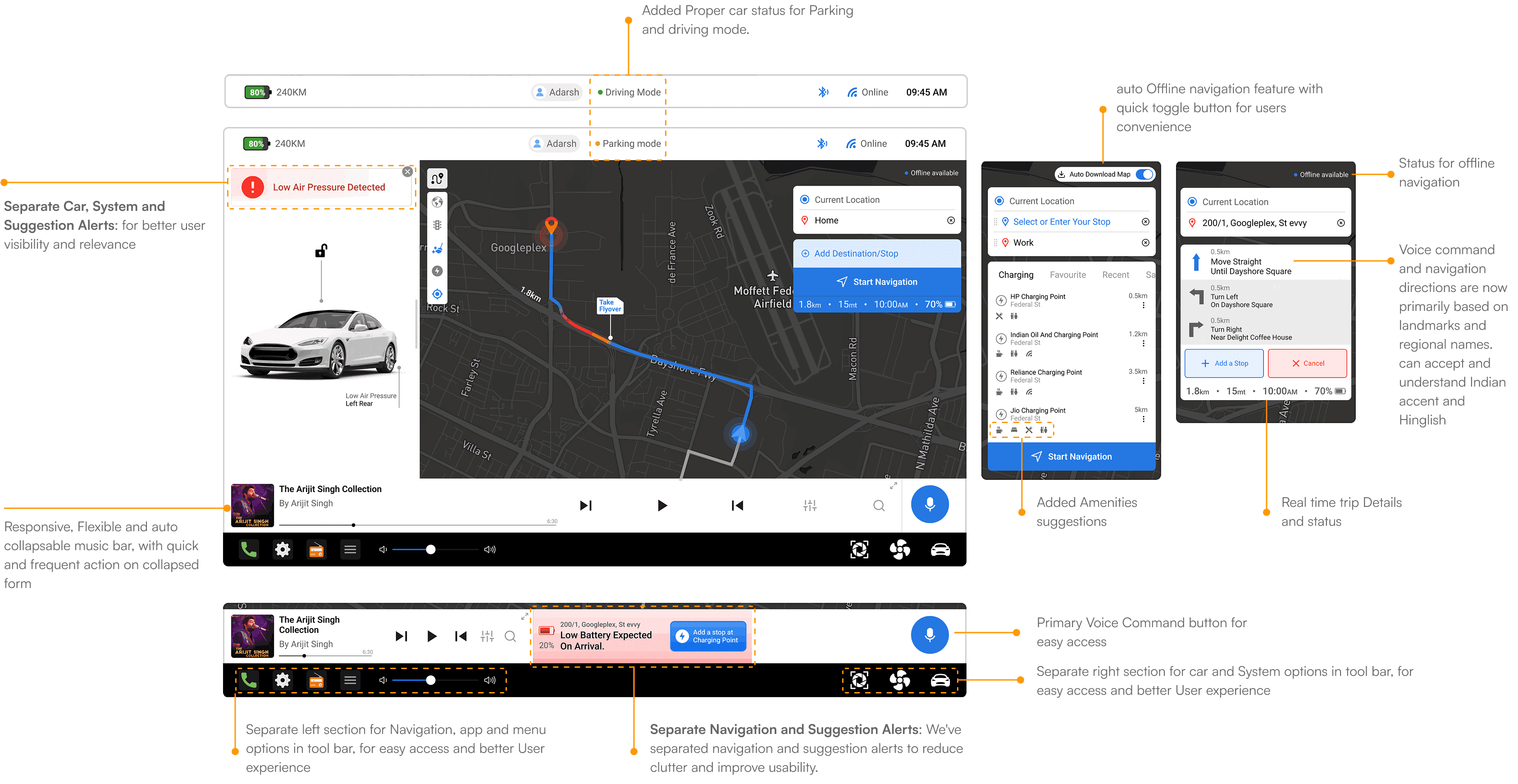
Restructuring the home screen with consistent layout for the overall interface
Restructuring the home screen with consistent layout for the overall interface
Restructuring the home screen with consistent layout for the overall interface
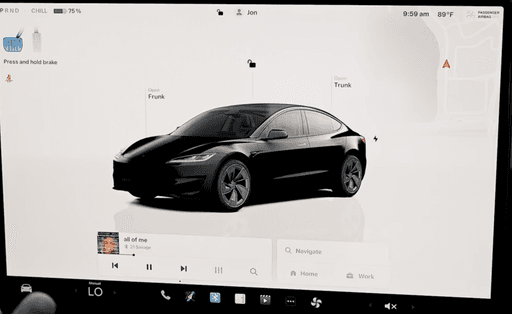
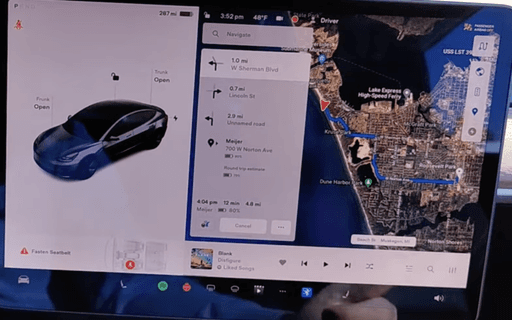
The strategy was to distribute the data sets in Well structured divisions that stayed at the consistent position all over the Interface with a User friendly hierarchy and proximity. here we studied the behaviour of the user while driving on short trips, long trips which aligned well with users mood, chill, chaotic, hurry, frustrated etc
The strategy was to distribute the data sets in Well structured divisions that stayed at the consistent position all over the Interface with a User friendly hierarchy and proximity. here we studied the behaviour of the user while driving on short trips, long trips which aligned well with users mood, chill, chaotic, hurry, frustrated etc
The strategy was to distribute the data sets in Well structured divisions that stayed at the consistent position all over the Interface with a User friendly hierarchy and proximity. here we studied the behaviour of the user while driving on short trips, long trips which aligned well with users mood, chill, chaotic, hurry, frustrated etc
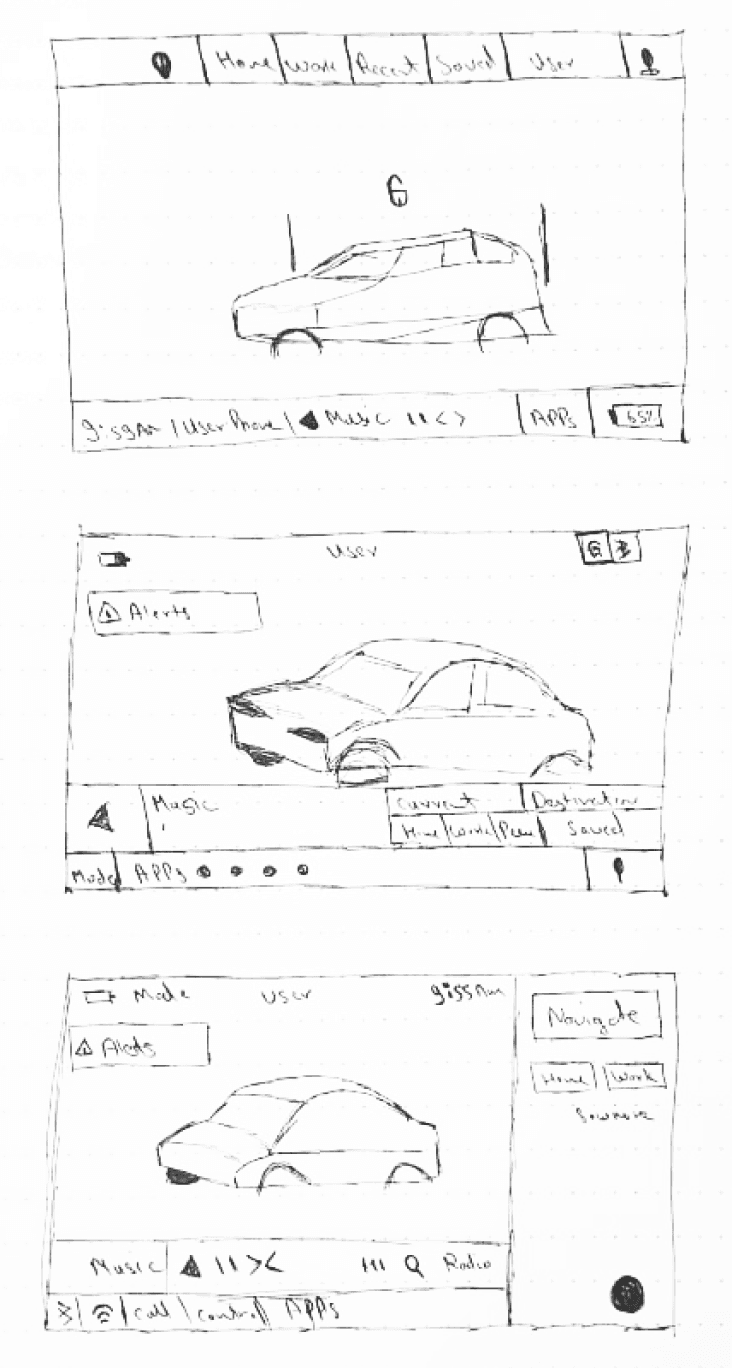
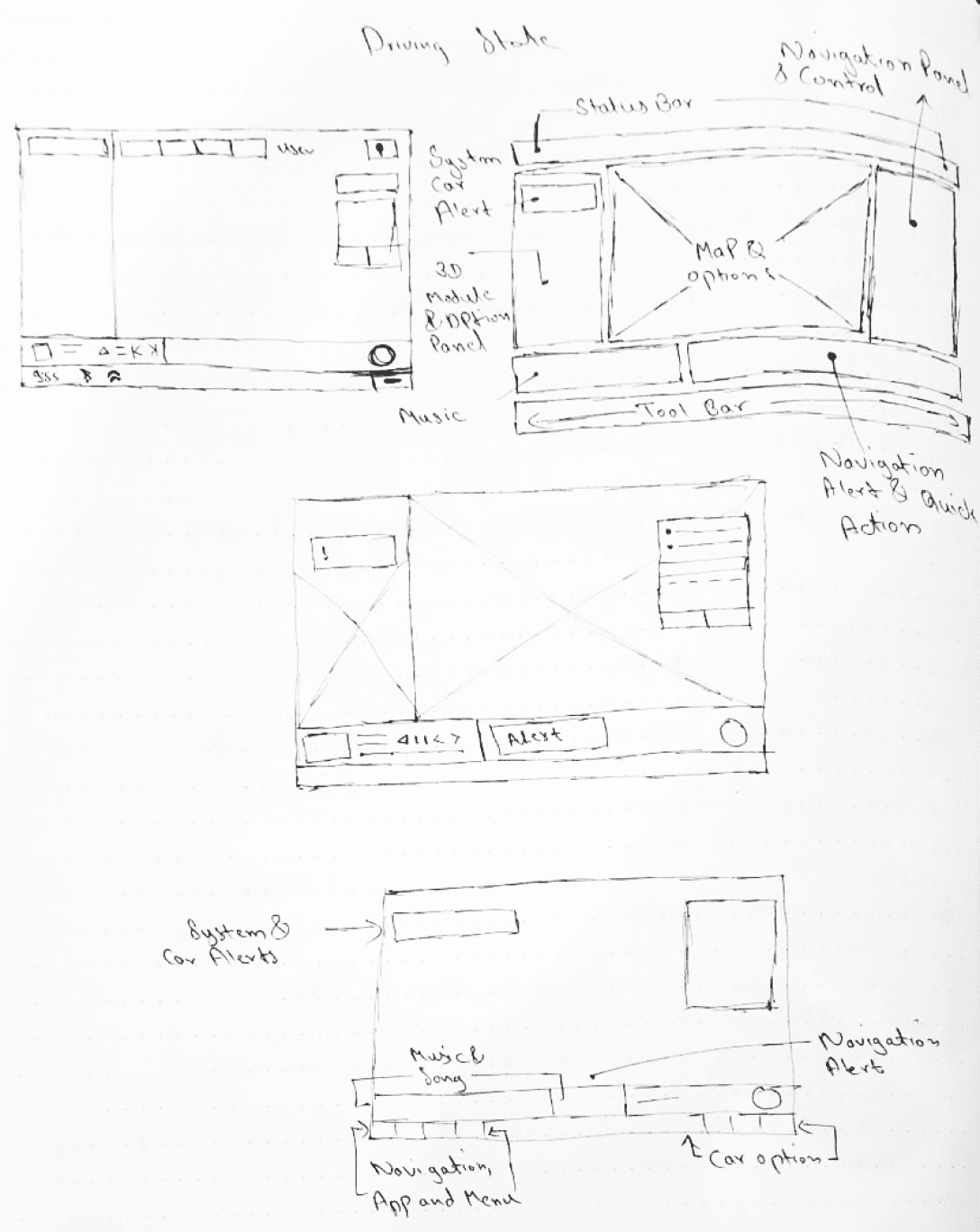
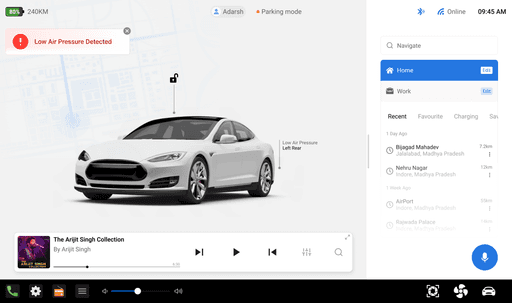
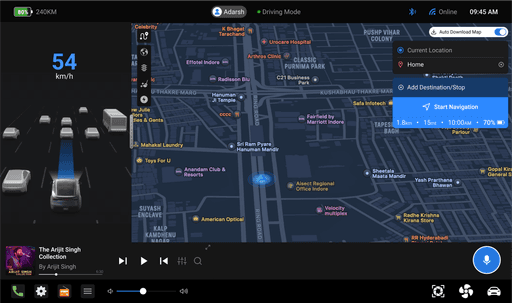
Removed overwhelming features
Removed overwhelming features
Created fixed divisions for layout consistency in both parking and driving mode
Created fixed divisions for layout consistency in both parking and driving mode
A full size navigation control panel for reducing taps and user efforts
A full size navigation control panel for reducing taps and user efforts
Better status bar with limited amount of default data making it relevant to user and clear
Better status bar with limited amount of default data making it relevant to user and clear
Placed Car and system alerts, and navigation alerts and notification separately
Placed Car and system alerts, and navigation alerts and notification separately
Categorised tool bar with navigation and menu option on the left and car options and setting on the right
Categorised tool bar with navigation and menu option on the left and car options and setting on the right
Get a Short overview of Some Basic changes & features We added
Get a Short overview of Some Basic changes & features We added
Contact me For a breif overview on design decisions and thought process
Contact me For a breif overview on design decisions and thought process
Challenges with Map
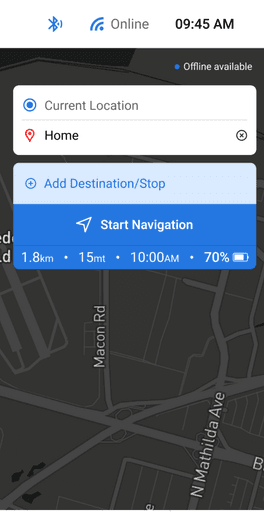
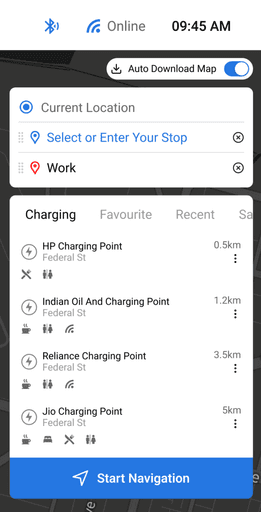
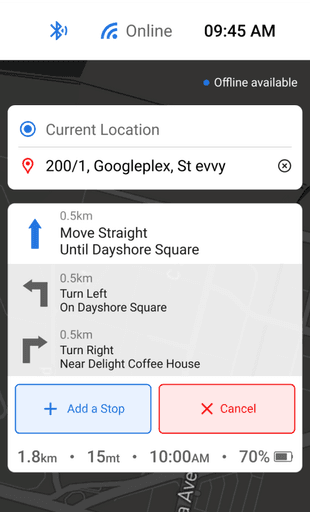
Offline navigation system
Offline navigation system
Introducing a smart feature that automatically downloads trip navigation in advance, ensuring uninterrupted access even with network issues or on longer trips.
1. Auto-Download: Trip navigation downloads in advance for seamless travel.
2. One-Tap Toggle: Easily toggle off this feature anytime via the status bar.
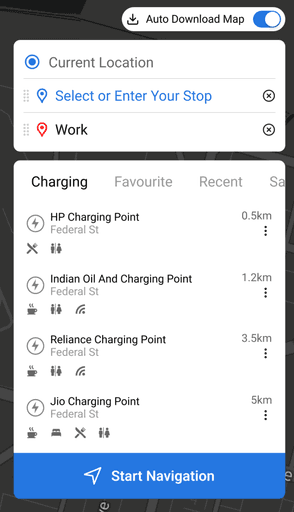
3. Safety backup: System backs up longer trips, including navigation details and suggestions for Charging points, Healthcare services, Emergency services, Stay amenities
Important Note: Auto-offline backup cannot be turned off, as it's designed for safety reasons.
4. Cache Clearance: Automatically clears safety backup cache memory after reaching the destination. and auto backup after 48 hours
Introducing a smart feature that automatically downloads trip navigation in advance, ensuring uninterrupted access even with network issues or on longer trips.
1. Auto-Download: Trip navigation downloads in advance for seamless travel.
2. One-Tap Toggle: Easily toggle off this feature anytime via the status bar.
3. Safety backup: System backs up longer trips, including navigation details and suggestions for Charging points, Healthcare services, Emergency services, Stay amenities
Important Note: Auto-offline backup cannot be turned off, as it's designed for safety reasons.
4. Cache Clearance: Automatically clears safety backup cache memory after reaching the destination. and auto backup after 48 hours
Introducing a smart feature that automatically downloads trip navigation in advance, ensuring uninterrupted access even with network issues or on longer trips.
1. Auto-Download: Trip navigation downloads in advance for seamless travel.
2. One-Tap Toggle: Easily toggle off this feature anytime via the status bar.
3. Safety backup: System backs up longer trips, including navigation details and suggestions for Charging points, Healthcare services, Emergency services, Stay amenities
Important Note: Auto-offline backup cannot be turned off, as it's designed for safety reasons.
4. Cache Clearance: Automatically clears safety backup cache memory after reaching the destination. and auto backup after 48 hours
Clean Mode
Clean Mode
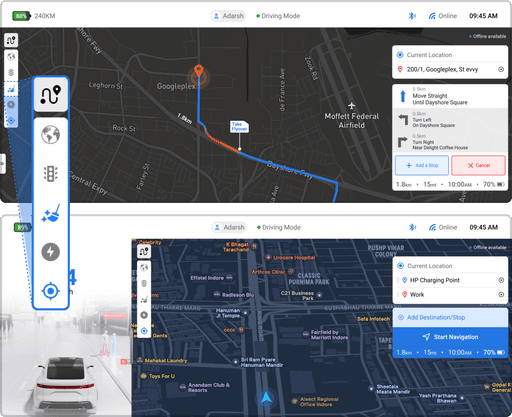
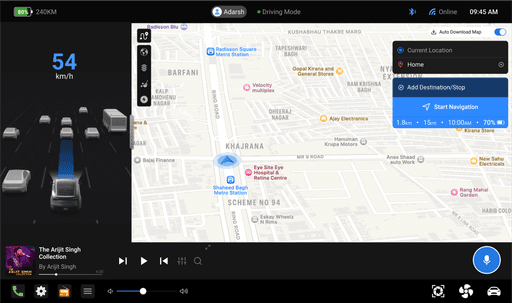
The visual noise can be a pain in eye while navigating in big cities. cant understand what is going in the map with all those pins and suggestions.
The clean mode helps getting rid of this pins and excessive location marks in just one tap. it helps in a clear view in a crowded map.
User will only view:
Crucial locations: police stations, fire stations, hospitals, and emergency spots
Essential services: charging points
Personalized markers: saved and favorite locations
Searched Location: Map will show pins and locations that are searched eg .“show me nearby restaurants”
The visual noise can be a pain in eye while navigating in big cities. cant understand what is going in the map with all those pins and suggestions.
The clean mode helps getting rid of this pins and excessive location marks in just one tap. it helps in a clear view in a crowded map.
User will only view:
Crucial locations: police stations, fire stations, hospitals, and emergency spots
Essential services: charging points
Personalized markers: saved and favorite locations
Searched Location: Map will show pins and locations that are searched eg .“show me nearby restaurants”
The visual noise can be a pain in eye while navigating in big cities. cant understand what is going in the map with all those pins and suggestions.
The clean mode helps getting rid of this pins and excessive location marks in just one tap. it helps in a clear view in a crowded map.
User will only view:
Crucial locations: police stations, fire stations, hospitals, and emergency spots
Essential services: charging points
Personalized markers: saved and favorite locations
Searched Location: Map will show pins and locations that are searched eg .“show me nearby restaurants”
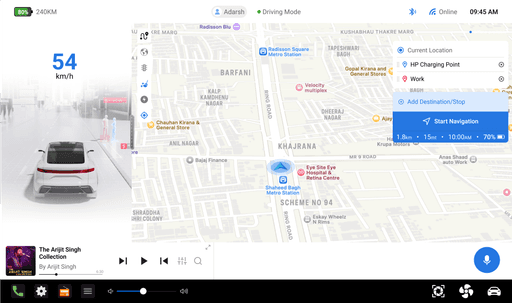
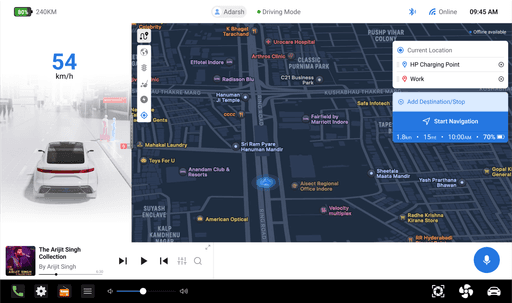
contrast mode- ON
contrast mode- OFF
Contrast Mode
Contrast Mode
By some research and feedbacks we got to know about that some user find the monotonous interface a bit difficult to navigate on, while driving you don’t want the driver to give complete focus on screen and this interface gets more time to learn and fit on the users muscle memory and reflex actions.
By some research and feedbacks we got to know about that some user find the monotonous interface a bit difficult to navigate on, while driving you don’t want the driver to give complete focus on screen and this interface gets more time to learn and fit on the users muscle memory and reflex actions.
By some research and feedbacks we got to know about that some user find the monotonous interface a bit difficult to navigate on, while driving you don’t want the driver to give complete focus on screen and this interface gets more time to learn and fit on the users muscle memory and reflex actions.
So We introduced the contrast mode beside the dark and light modes, the contrast mode will be ON by default.
So We introduced the contrast mode beside the dark and light modes, the contrast mode will be ON by default.
So We introduced the contrast mode beside the dark and light modes, the contrast mode will be ON by default.
it makes the interface much easier to focus on the map, floating feature panels and bars. it show a really high statistics that a little focus and a slight view on the map can recognise features panels and bars.
it makes the interface much easier to focus on the map, floating feature panels and bars. it show a really high statistics that a little focus and a slight view on the map can recognise features panels and bars.
it makes the interface much easier to focus on the map, floating feature panels and bars. it show a really high statistics that a little focus and a slight view on the map can recognise features panels and bars.
This feature is all for user convenience and user experience, they can switch to any mode from the setting>display, whichever feature they are comfortable with.
This feature is all for user convenience and user experience, they can switch to any mode from the setting>display, whichever feature they are comfortable with.
This feature is all for user convenience and user experience, they can switch to any mode from the setting>display, whichever feature they are comfortable with.
User Experience and Road Challenges
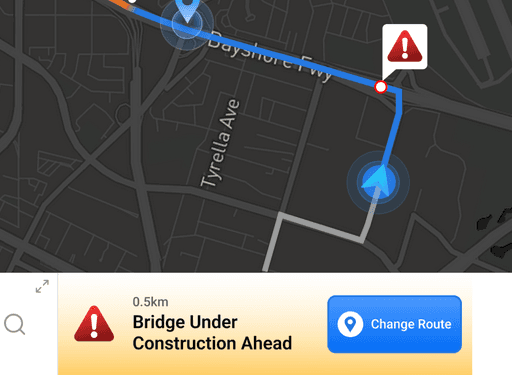
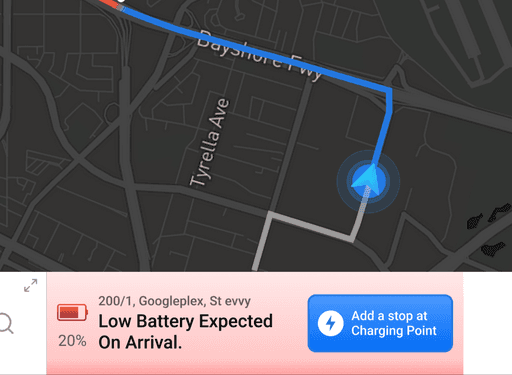
Refined navigation alerts and quick actions in a better and user friendly way, we pointed out the issues and problems statements of the users and redesigned the new alert and navigation notification system, below the map with assistive message and visible button for quick actions.
Refined navigation alerts and quick actions in a better and user friendly way, we pointed out the issues and problems statements of the users and redesigned the new alert and navigation notification system, below the map with assistive message and visible button for quick actions.
We enhanced the voice command system to better understand Indian accents and common Hinglish phrases making it feel more natural and usable for everyday Indian drivers.
In addition, we introduced landmark-based navigation that uses familiar local names and places while guiding routes. Over time, regular usage helps the system learn and suggest native destinations more accurately making navigation feel more human and intuitive.
In addition, we introduced landmark-based navigation that uses familiar local names and places while guiding routes. Over time, regular usage helps the system learn and suggest native destinations more accurately making navigation feel more human and intuitive.
In addition, we introduced landmark-based navigation that uses familiar local names and places while guiding routes. Over time, regular usage helps the system learn and suggest native destinations more accurately making navigation feel more human and intuitive.
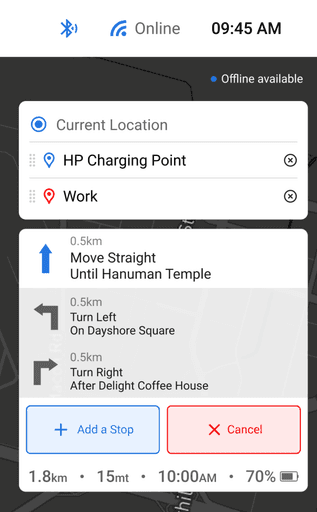
To further improve trip planning, we simplified the multi-stop trip experience. Users can now easily add, remove, or rearrange stops using simple drag-and-drop gestures mirroring familiar interactions from mobile apps. This intentional design choice helps users feel at home and reduces confusion during planning or while driving.
To further improve trip planning, we simplified the multi-stop trip experience. Users can now easily add, remove, or rearrange stops using simple drag-and-drop gestures mirroring familiar interactions from mobile apps. This intentional design choice helps users feel at home and reduces confusion during planning or while driving.
To further improve trip planning, we simplified the multi-stop trip experience. Users can now easily add, remove, or rearrange stops using simple drag-and-drop gestures mirroring familiar interactions from mobile apps. This intentional design choice helps users feel at home and reduces confusion during planning or while driving.
Smart Alert System
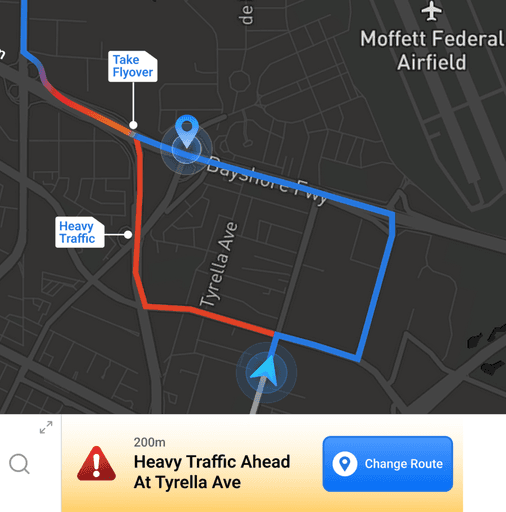
Many users reported confusion when the navigation route changed unexpectedly often due to signals, heavy traffic, or road conditions without clear explanation.
To solve this, we introduced a smart alert system that notifies users whenever a route change occurs, along with the reason behind it.
Clear labels like “Heavy traffic ahead”, “Toll detected”, or “Road under construction” appear directly below the map.
These alerts include suggestive actions (like accept alternate route or ignore), keeping drivers informed and in control at all times.
This creates more trust in the navigation system and reduces sudden decision-making stress mid-drive.
Many users reported confusion when the navigation route changed unexpectedly often due to signals, heavy traffic, or road conditions without clear explanation.
To solve this, we introduced a smart alert system that notifies users whenever a route change occurs, along with the reason behind it.
Clear labels like “Heavy traffic ahead”, “Toll detected”, or “Road under construction” appear directly below the map.
These alerts include suggestive actions (like accept alternate route or ignore), keeping drivers informed and in control at all times.
This creates more trust in the navigation system and reduces sudden decision-making stress mid-drive.
Many users reported confusion when the navigation route changed unexpectedly often due to signals, heavy traffic, or road conditions without clear explanation.
To solve this, we introduced a smart alert system that notifies users whenever a route change occurs, along with the reason behind it.
Clear labels like “Heavy traffic ahead”, “Toll detected”, or “Road under construction” appear directly below the map.
These alerts include suggestive actions (like accept alternate route or ignore), keeping drivers informed and in control at all times.
This creates more trust in the navigation system and reduces sudden decision-making stress mid-drive.
Impact & Reflections
Impact & Reflections
There were many interface tweaks and improvements that couldn’t be covered in this case study to keep it concise. However, this project reflects a clear vision of how Tesla’s navigation can evolve for India exploring local challenges, behaviours, and opportunities to create a modern, user-centric, and uniquely Indian driving experience.
There were many interface tweaks and improvements that couldn’t be covered in this case study to keep it concise. However, this project reflects a clear vision of how Tesla’s navigation can evolve for India exploring local challenges, behaviours, and opportunities to create a modern, user-centric, and uniquely Indian driving experience.
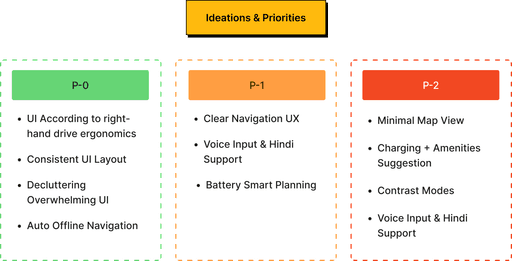
P-0
P-0
P-0
UI According to right-hand drive ergonomics
UI According to right-hand drive ergonomics
UI According to right-hand drive ergonomics
Consistent UI Layout
Consistent UI Layout
Consistent UI Layout
Decluttering Overwhelming UI
Decluttering Overwhelming UI
Decluttering Overwhelming UI
Auto Offline Navigation
Auto Offline Navigation
Auto Offline Navigation
P-1
P-1
P-1
Clear Navigation UX
Clear Navigation UX
Clear Navigation UX
Voice Input & Hindi Support
Voice Input & Hindi Support
Voice Input & Hindi Support
Battery Smart Planning
Battery Smart Planning
Battery Smart Planning
P-2
P-2
P-2
Minimal Map View
Minimal Map View
Minimal Map View
Charging + Amenities Suggestion
Charging + Amenities Suggestion
Charging + Amenities Suggestion
Contrast Modes
Contrast Modes
Contrast Modes
Voice Input & Hindi Support
Voice Input & Hindi Support
Voice Input & Hindi Support
Current check list is optimised in new UX and Interface with many plus features and optimisations
Current check list is optimised in new UX and Interface with many plus features and optimisations
Current check list is optimised in new UX and Interface with many plus features and optimisations
This redesign wasn’t just about tweaking buttons or cleaning up screens it was about reimagining what navigation should feel like for an Indian Tesla driver.
From offline-first smart routing to Hinglish voice support, from landmark-based guidance to minimal map modes, every decision was rooted in one goal: to reduce distraction, build trust, and help the car think more like its driver.
By removing the clutter, simplifying key actions, and staying culturally aware of how Indians interact with tech, this navigation system starts to feel less like a foreign interface and more like a natural co-pilot.
It builds confidence when the roads get unpredictable.
It offers clarity when distractions are high.
And most importantly, it adds a layer of comfort and familiarity to a futuristic machine.
This redesign wasn’t just about tweaking buttons or cleaning up screens it was about reimagining what navigation should feel like for an Indian Tesla driver.
From offline-first smart routing to Hinglish voice support, from landmark-based guidance to minimal map modes, every decision was rooted in one goal: to reduce distraction, build trust, and help the car think more like its driver.
By removing the clutter, simplifying key actions, and staying culturally aware of how Indians interact with tech, this navigation system starts to feel less like a foreign interface and more like a natural co-pilot.
It builds confidence when the roads get unpredictable.
It offers clarity when distractions are high.
And most importantly, it adds a layer of comfort and familiarity to a futuristic machine.
This redesign wasn’t just about tweaking buttons or cleaning up screens it was about reimagining what navigation should feel like for an Indian Tesla driver.
From offline-first smart routing to Hinglish voice support, from landmark-based guidance to minimal map modes, every decision was rooted in one goal: to reduce distraction, build trust, and help the car think more like its driver.
By removing the clutter, simplifying key actions, and staying culturally aware of how Indians interact with tech, this navigation system starts to feel less like a foreign interface and more like a natural co-pilot.
It builds confidence when the roads get unpredictable.
It offers clarity when distractions are high.
And most importantly, it adds a layer of comfort and familiarity to a futuristic machine.
What can be the next approach?
What can be the next approach?
As we look ahead, there’s enormous potential to make the experience even more contextual and localized:
Collaboration with MapMyIndia for more accurate, real-time mapping data.
Training voice assistants on regional languages and slang using crowd-sourced datasets.
Emergency fallback modes using SMS-based directions or embedded storage in extreme offline zones.
Community-sourced hazard alerts (like potholes or flooding) to boost local road awareness.
As we look ahead, there’s enormous potential to make the experience even more contextual and localized:
Collaboration with MapMyIndia for more accurate, real-time mapping data.
Training voice assistants on regional languages and slang using crowd-sourced datasets.
Emergency fallback modes using SMS-based directions or embedded storage in extreme offline zones.
Community-sourced hazard alerts (like potholes or flooding) to boost local road awareness.
and above all this, testing the prototype among the users and fixing the potentials issues making it a never ending process which evolves according to its users, their needs, expectations and possibilities.
and above all this, testing the prototype among the users and fixing the potentials issues making it a never ending process which evolves according to its users, their needs, expectations and possibilities.
Thank you
Thank you
This is just the first lap, more updates ahead, because great UX is always under construction.
This is just the first lap, more updates ahead, because great UX is always under construction.
PRODUCT
Design
Content
Publish
RESOURCES
Blog
Careers
Docs
About
COMMUNITY
Join
Events
Experts
Follow Me at
Or reach at
Social
Twitter(X)
Twitter(X)
Behance
Behance
#a_design_that_breaths
Created with passion by prashant
Created with passion by prashant
Indore, MP, India
Version
© 2025 Edition